Code
in a
While
Watch on YouTube
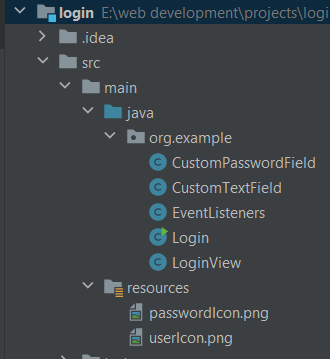
Create a new project in Intellij with the following directory structure. Here I have used the icons from google icons in png format.
This class adds the ability to display a placeholder text in the text field, which indicates the expected input for user. The placeholder text will be shown when the text field is empty and will be replaced by user input when the field is focused or populated.
                        content_copy
                        copy

                        package org.example;

import javax.swing.*;

public class CustomTextField extends JTextField{

    private String placeholder;
    private boolean hasPlaceholder;

    CustomTextField(String placeholder){
        super(placeholder);
        this.placeholder = placeholder;
        this.hasPlaceholder = true;
    }

    public String getPlaceholder() {
        return placeholder;
    }

    public void setPlaceholder(String placeholder) {
        this.placeholder = placeholder;
    }

    public boolean hasPlaceholder() {
        return hasPlaceholder;
    }

    public void setHasPlaceholder(boolean hasPlaceholder) {
        this.hasPlaceholder = hasPlaceholder;
    }
}
This class adds the ability to display a placeholder text in the password field, which indicates the expected input for user. The placeholder text will be shown when the password field is empty and will be replaced by user input when the field is focused or populated.
                        content_copy
                        copy

                    package org.example;

import javax.swing.*;

public class CustomPasswordField extends JPasswordField {
    private String placeholder;
    private boolean hasPlaceholder;

    CustomPasswordField(String placeholder){
        super(placeholder);
        this.placeholder = placeholder;
        this.hasPlaceholder = true;
    }

    public String getPlaceholder() {
        return placeholder;
    }

    public void setPlaceholder(String placeholder) {
        this.placeholder = placeholder;
    }

    public boolean hasPlaceholder() {
        return hasPlaceholder;
    }

    public void setHasPlaceholder(boolean hasPlaceholder) {
        this.hasPlaceholder = hasPlaceholder;
    }
}
This class creates a user interface of a login form, including fields for username and password, icons for each field, and a login button. It uses a GridBagLayout to arrange components and provides various customization options for the appearance of the components.
                        content_copy
                        copy

                    package org.example;

import javax.swing.*;
import javax.swing.border.Border;
import java.awt.*;


public class LoginView extends JFrame {

    //    components
    private JLabel loginTitle;
    private CustomTextField userNameField;
    private CustomPasswordField passwordField;
    private JLabel userIcon;
    private JLabel passIcon;
    private JButton loginBtn;
    private JLabel registerCall;
    //    constraints for grid bag layout
    private GridBagConstraints gbc;

    public LoginView(){
        super("Log In");
        createLogInView();
    }

    // constants
    public static final Dimension frameSize = new Dimension(500, 600);
    public static final Color bg = new Color(26, 31, 113);
    public static final Color fg = new Color(247,182,0);
    public static final Font headingFont = new Font("Arial", Font.BOLD, 35);
    public static final Dimension textFieldSize = new Dimension(300, 30);
    public static final Font textFieldFont = new Font("Arial", Font.PLAIN, 16);
    public static final Border textFieldBorder = BorderFactory.createMatteBorder(0, 0, 1, 0, fg);
    public static final Dimension iconSize = new Dimension(30, 30);
    public static final Font btnFont = new Font("Arial", Font.PLAIN, 18);
    public static final Dimension btnSize = new Dimension(100, 30);

    private void createLoginTitle(){
        this.loginTitle = new JLabel("Log In");
        this.loginTitle.setFont(headingFont);
        this.loginTitle.setForeground(fg);
        // set grid bag constraints
        gbc.gridx = 0;
        gbc.gridy = 0;
        gbc.insets = new Insets(0, 0, 70, 0);
        getContentPane().add(loginTitle, gbc);
    }

    private void createUserName(){
        this.userNameField = new CustomTextField("User Name");
        this.userNameField.setPreferredSize(textFieldSize);
        this.userNameField.setForeground(Color.lightGray);
        this.userNameField.setBackground(bg);
        this.userNameField.setFont(textFieldFont);
        this.userNameField.setBorder(textFieldBorder);
        this.userNameField.setCaretColor(fg);

        // set grid bag constraints
        gbc.gridx = 0;
        gbc.gridy = 1;
        gbc.insets = new Insets(0, 0, 30, 0);
        getContentPane().add(userNameField, gbc);
    }

    private void createPassword(){
        this.passwordField = new CustomPasswordField("Password");
        // make password placeholder visible
        this.passwordField.setEchoChar((char) 0);
        this.passwordField.setPreferredSize(textFieldSize);
        this.passwordField.setForeground(Color.LIGHT_GRAY);
        this.passwordField.setBackground(bg);
        this.passwordField.setFont(textFieldFont);
        this.passwordField.setBorder(textFieldBorder);
        this.passwordField.setCaretColor(fg);

        // set grid bag constraints
        gbc.gridx = 0;
        gbc.gridy = 2;
        gbc.insets = new Insets(0, 0, 40, 0);
        getContentPane().add(passwordField, gbc);
    }

    private void createUserIcon(){
        this.userIcon = new JLabel();
        this.userIcon.setIcon(new javax.swing.ImageIcon("src/main/resources/userIcon.png"));
        this.userIcon.setPreferredSize(iconSize);
        this.userIcon.setHorizontalAlignment(SwingConstants.CENTER);

        // set grid bag constraints
        gbc.gridx = 1;
        gbc.gridy = 1;
        gbc.anchor = GridBagConstraints.NORTH;
        gbc.insets = new Insets(0, 5, 0, 0);
        getContentPane().add(userIcon, gbc);
    }

    private void createPassIcon(){
        this.passIcon = new JLabel();
        this.passIcon.setIcon(new javax.swing.ImageIcon("src/main/resources/passwordIcon.png"));
        this.passIcon.setPreferredSize(iconSize);
        this.passIcon.setHorizontalAlignment(SwingConstants.CENTER);

        // set grid bag constraints
        gbc.gridx = 1;
        gbc.gridy = 2;
        gbc.anchor = GridBagConstraints.NORTH;
        gbc.insets = new Insets(0, 5, 0, 0);
        getContentPane().add(passIcon, gbc);
    }

    private void createLoginBtn(){
        this.loginBtn = new JButton("Log In");
        this.loginBtn.setFont(btnFont);
        this.loginBtn.setPreferredSize(btnSize);
        this.loginBtn.setBackground(fg);
        this.loginBtn.setForeground(Color.BLACK);
        this.loginBtn.setBorder(BorderFactory.createEmptyBorder());

        // set grid bag constraints
        gbc.gridx = 0;
        gbc.gridy = 3;
        gbc.insets = new Insets(0, 0, 20, 0);
        getContentPane().add(loginBtn, gbc);
    }

    private void createRegisterCall(){
        this.registerCall = new JLabel("Don't have an account? Register");
        this.registerCall.setFont(btnFont);
        this.registerCall.setCursor(new Cursor(Cursor.HAND_CURSOR));
        this.registerCall.setForeground(Color.WHITE);

        // set grid bag constraints
        gbc.gridx = 0;
        gbc.gridy = 4;
        getContentPane().add(registerCall, gbc);
    }

    public void createLogInView(){
        this.setDefaultCloseOperation(EXIT_ON_CLOSE);
        this.setSize(frameSize);

        Container contentPane = this.getContentPane();
        contentPane.setBackground(bg);

        // use grid bag constraints layout and initialize grid bag constraints object
        contentPane.setLayout(new GridBagLayout());
        this.gbc = new GridBagConstraints();

        // add components to frame
        createLoginTitle();
        createUserName();
        createPassword();
        createUserIcon();
        createPassIcon();
        createLoginBtn();
        createRegisterCall();
    }

    public JLabel getLoginTitle() {
        return loginTitle;
    }

    public void setLoginTitle(JLabel loginTitle) {
        this.loginTitle = loginTitle;
    }

    public CustomTextField getUserNameField() {
        return userNameField;
    }

    public void setUserNameField(CustomTextField userNameField) {
        this.userNameField = userNameField;
    }

    public CustomPasswordField getPasswordField() {
        return passwordField;
    }

    public void setPasswordField(CustomPasswordField passwordField) {
        this.passwordField = passwordField;
    }

    public JLabel getUserIcon() {
        return userIcon;
    }

    public void setUserIcon(JLabel userIcon) {
        this.userIcon = userIcon;
    }

    public JLabel getPassIcon() {
        return passIcon;
    }

    public void setPassIcon(JLabel passIcon) {
        this.passIcon = passIcon;
    }

    public JButton getLoginBtn() {
        return loginBtn;
    }

    public void setLoginBtn(JButton loginBtn) {
        this.loginBtn = loginBtn;
    }

    public JLabel getRegisterCall() {
        return registerCall;
    }

    public void setRegisterCall(JLabel registerCall) {
        this.registerCall = registerCall;
    }

    public GridBagConstraints getGbc() {
        return gbc;
    }

    public void setGbc(GridBagConstraints gbc) {
        this.gbc = gbc;
    }
}
This class implements multiple listener interfaces to handle events related to the login form, such as entering and exiting text fields, clicking buttons, and hovering over labels.
                        content_copy
                        copy

                    package org.example;

import javax.swing.*;
import java.awt.*;
import java.awt.event.*;

public class EventListeners implements ActionListener, KeyListener, FocusListener, MouseListener {

    private LoginView loginView;

    // inject login view
    EventListeners(LoginView loginView){
        this.loginView = loginView;
    }

    // Removes the placeholder from a password field if present. It clears the text and updates
    // the field's color to distinguish between placeholder and user input.
    private void removePasswordPlaceholder(CustomPasswordField customPasswordField){
        if(customPasswordField.hasPlaceholder()){
            customPasswordField.setText("");
            customPasswordField.setHasPlaceholder(false);
            customPasswordField.setForeground(Color.WHITE);
            // hide password
            customPasswordField.setEchoChar('*');
        }
    }

    // Removes the placeholder from a text field if present. It clears the text and updates
    // the field's color to distinguish between placeholder and user input.
    private void removeTextPlaceholder(CustomTextField customTextField){
        if(customTextField.hasPlaceholder()){
            customTextField.setText("");
            customTextField.setHasPlaceholder(false);
            customTextField.setForeground(Color.WHITE);
        }
    }

    // Adds the placeholder text to a text field if it is empty. Sets the placeholder text and
    // updates the field's color to indicate that it is not currently being edited.
    private void addTextPlaceholder(CustomTextField customTextField){
        if(customTextField.getText().isEmpty()){
            customTextField.setText(customTextField.getPlaceholder());
            customTextField.setHasPlaceholder(true);
            customTextField.setForeground(Color.LIGHT_GRAY);
        }
    }

    // Adds the placeholder text to a password field if it is empty. Sets the placeholder text
    // and updates the field's color to indicate that it is not currently being edited.
    private void addPasswordPlaceholder(CustomPasswordField customPasswordField){
        if(customPasswordField.getPassword().length == 0){
            customPasswordField.setText(customPasswordField.getPlaceholder());
            customPasswordField.setHasPlaceholder(true);
            customPasswordField.setForeground(Color.LIGHT_GRAY);
            // show password placeholder
            customPasswordField.setEchoChar((char) 0);
        }
    }

    // Handles mouse click events to remove the placeholder text from text and password fields.
    @Override
    public void mouseClicked(MouseEvent e) {
        if(e.getSource() instanceof CustomTextField customTextField){
            removeTextPlaceholder(customTextField);
        }
        if(e.getSource() instanceof CustomPasswordField customPasswordField){
            removePasswordPlaceholder(customPasswordField);
        }
    }

    // Handles key press events to remove the placeholder text from text and password fields.
    @Override
    public void keyPressed(KeyEvent e) {
        Object source = e.getSource();

        if(source instanceof CustomTextField customTextField){
            removeTextPlaceholder(customTextField);
        }
        if(source instanceof CustomPasswordField customPasswordField){
            removePasswordPlaceholder(customPasswordField);
        }
    }

    // Handles focus lost events to add placeholder text back to text and password fields if they are empty.
    @Override
    public void focusLost(FocusEvent e) {
        if(e.getSource() instanceof CustomTextField customTextField){
            addTextPlaceholder(customTextField);
        }
        if(e.getSource() instanceof CustomPasswordField customPasswordField){
            addPasswordPlaceholder(customPasswordField);
        }
    }

    // Handles action events, such as button clicks, to validate input fields and show appropriate messages. Displays an error message if any field is empty or incorrect, or a success message if the credentials are correct.
    @Override
    public void actionPerformed(ActionEvent e) {
        if(e.getSource() instanceof JButton){
            // check if any of input fields is empty using placeholder bool
            if(loginView.getUserNameField().hasPlaceholder() || loginView.getPasswordField().hasPlaceholder()) {
                JOptionPane.showMessageDialog(loginView, "Please enter all fields", "result", JOptionPane.ERROR_MESSAGE);
            }
            else {
                if(loginView.getUserNameField().getText().equals("user")
                && loginView.getPasswordField().getText().equals("password")){
                    JOptionPane.showMessageDialog(loginView, "Success", "result", JOptionPane.PLAIN_MESSAGE);
                }
                else JOptionPane.showMessageDialog(loginView, "Either userName or password is incorrect", "result", JOptionPane.ERROR_MESSAGE);
            }
        }
    }

    @Override
    public void focusGained(FocusEvent e) {

    }

    @Override
    public void keyTyped(KeyEvent e) {

    }

    @Override
    public void keyReleased(KeyEvent e) {

    }

    @Override
    public void mousePressed(MouseEvent e) {

    }

    @Override
    public void mouseReleased(MouseEvent e) {

    }

    // Changes the color of the register call label when the mouse enters its area.
    @Override
    public void mouseEntered(MouseEvent e) {
        if(e.getSource() instanceof JLabel label){
            if(label.getText().contains("Register")){
                label.setForeground(LoginView.fg);
            }
        }
    }

    // Resets the color of the register call label when the mouse exits its area.
    @Override
    public void mouseExited(MouseEvent e) {
        if(e.getSource() instanceof JLabel label){
            if(label.getText().contains("Register")){
                label.setForeground(Color.WHITE);
            }
        }
    }
}
This class is responsible for creating and displaying the login interface and attaching event listeners to the relevant components such as text fields, buttons, and labels.
                        content_copy
                        copy

                    package org.example;

public class Login {

    private LoginView loginView;
    private EventListeners eventListeners;

    // Creates a new LoginView instance, centers it on the screen, and makes it visible.
    public void initLoginView(){
        this.loginView = new LoginView();
        this.loginView.setLocationRelativeTo(null);
        this.loginView.setVisible(true);
    }

    // Attaches key, mouse, and focus listeners to the username and password text fields.
    // Adds an action listener to the login button and a mouse listener to the register call label.
    private void addEventListener(){
        // username text field listeners
        loginView.getUserNameField().addKeyListener(eventListeners);
        loginView.getUserNameField().addMouseListener(eventListeners);
        loginView.getUserNameField().addFocusListener(eventListeners);

        // password field listeners
        loginView.getPasswordField().addKeyListener(eventListeners);
        loginView.getPasswordField().addMouseListener(eventListeners);
        loginView.getPasswordField().addFocusListener(eventListeners);

        // login btn listener
        loginView.getLoginBtn().addActionListener(eventListeners);

        // register call listener
        loginView.getRegisterCall().addMouseListener(eventListeners);
    }

    // The entry point of the application. Creates an instance of {@code Login}, initializes the
    // login view, sets up event listeners, and makes the login view visible.
    public static void main(String[] args){
        Login login = new Login();
        login.initLoginView();
        login.eventListeners = new EventListeners(login.loginView);
        login.addEventListener();
    }
}
This colcludes our login form in Java Swing.
In this tutorial, we've walked through the essential steps to design a login interface, including setting up the LoginView, handling user inputs with EventListeners, and integrating event-driven functionality.
We hope this guide has provided you with valuable insights into Swing GUI development.